Admin Area: Adding Records
Whilst the main way of adding data to Coreo is via the app, there may be scenarios where you need to add records to your project from your desk. In Coreo you can add records in the admin area, via the records page, if required.
To do so is simply:
- Click the green ‘Add Record’ button in the top right of the screen.

- From the drop down select the type of record you wish to add via the list of project forms.
Note: You will only be able to add top level records from the drop down (any sub-form data will be added via the main form rather than via the drop down.)

A window will open presenting you with the full list of questions associated with the form you have selected, including any sub-forms.

If your form contains a location question you will be able to add geometries, as you would in the app.
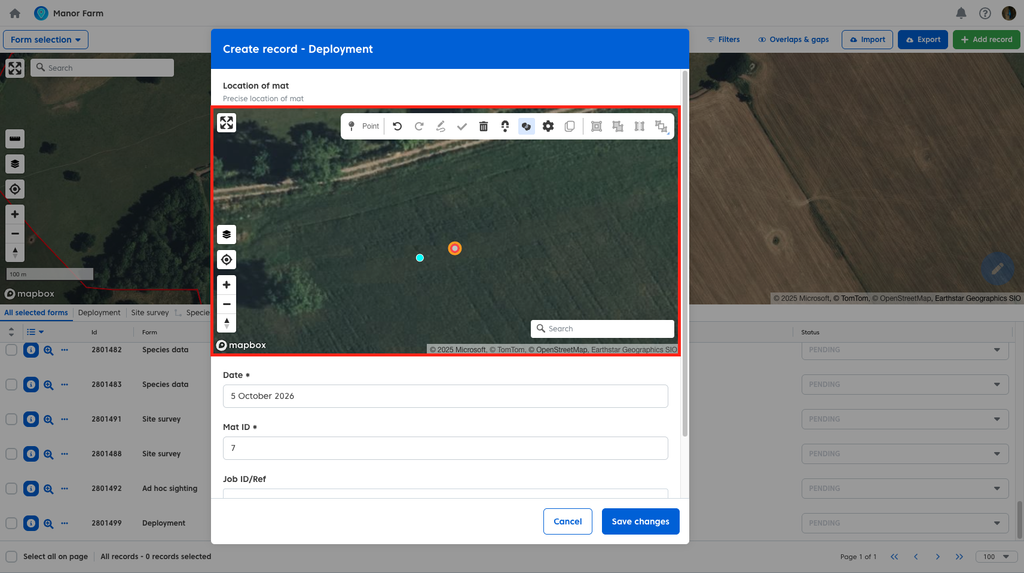
Once you have completed the questions in your form click ‘Save Changes’ to complete your record.

Was this article helpful?
Thanks for your feedback!