Post-Intervention: Uploading a Site Plan
You can upload a proposed site plan image to use as a visual reference when creating your post-intervention plan.
Uploading a GeoTIFF Image
If you have a geo-referenced site plan, you can upload it as a GeoTIFF.
To upload a site image:
- Open the Site image dropdown in the plan tool bar.

- Click ‘Import proposed site image’.
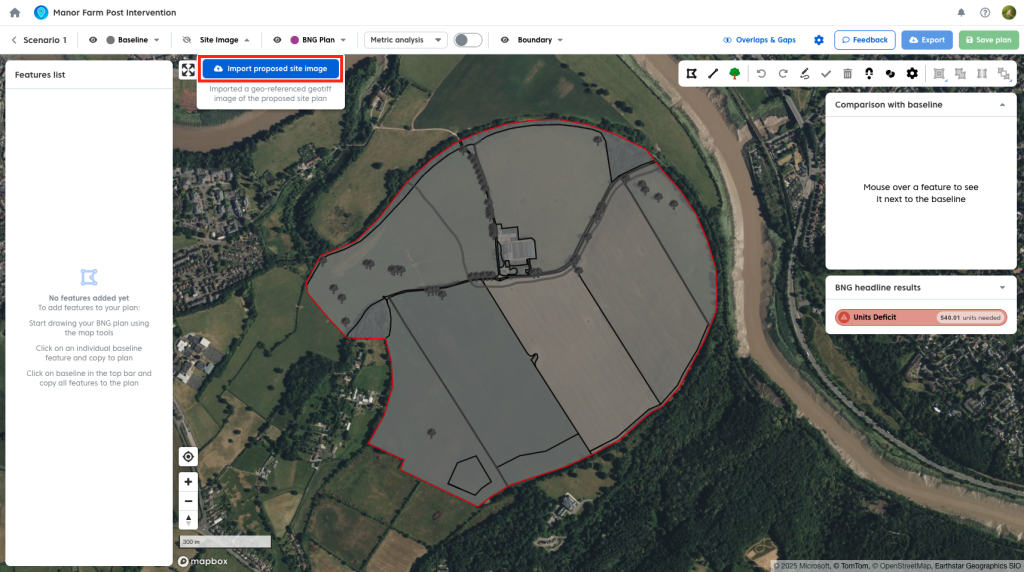
- Select your GeoTIFF file and upload it.
Once uploaded, the image will appear on the map.
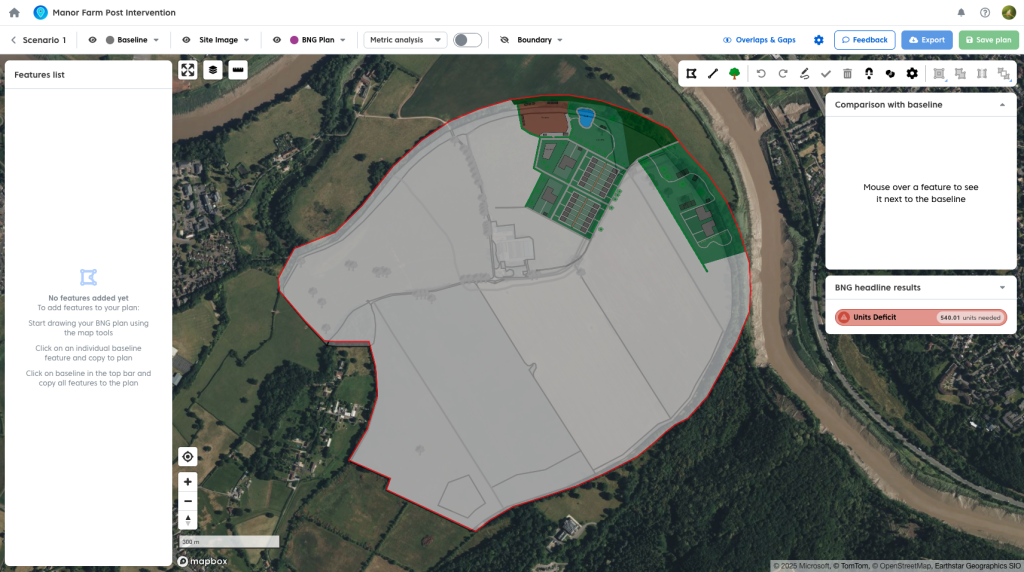
You can:
- Adjust the opacity to view the baseline beneath.

- Toggle the image on or off as needed.

Note: Once you have a map image uploaded you will need to hide this to select a feature form the baseline underneath it.
Geo-referencing
Coreo currently requires site images to be pre-geo-referenced using external tools.
A built-in geo-referencing tool will be available in a future release.
Importing a Plan from Shapefiles
If you have shapefiles for an existing post-intervention plan, you can import the geometry directly into your plan. You can see how to do so here.
This allows you to bring in pre-designed layouts and continue working with them in Coreo.